WezTerm Terminal Emulator - Cross-Platform, High-Performance, Versatile, and User-Friendly
Key Features of WezTerm
-
Supports Windows and Linux.
-
After splitting panes, you can resize them by dragging the border lines with your mouse.
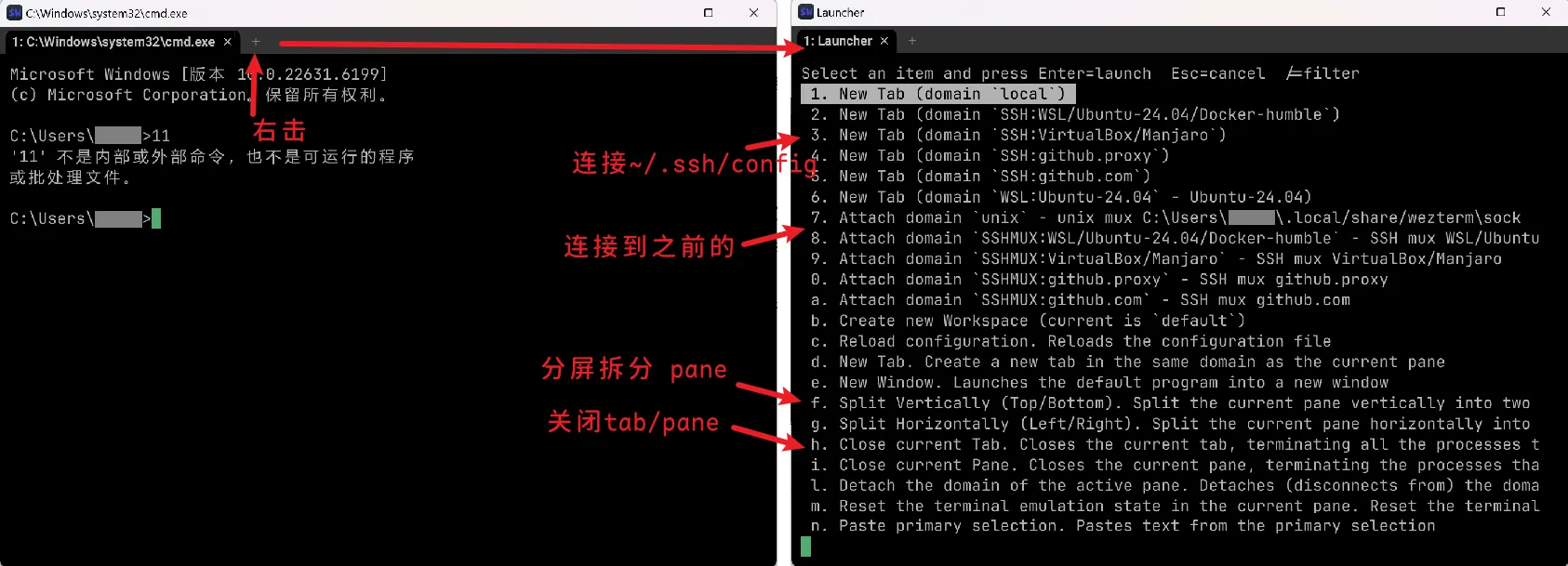
- You can right-click the tab bar’s plus button to split, as shown below;
- Or use keyboard shortcuts:
Ctrl+Shift+Alt+%for horizontal split (left/right),Ctrl+Shift+Alt+"for vertical split (top/bottom).
-
Supports saving and restoring layouts and sessions.
Two methods are available:
- Built-in multiplexer (Unix Domain, requires installing WezTerm on the server side) + CLI / right-click context menu.
- Lua plugin for restoring previous state: https://github.com/MLFlexer/resurrect.wezterm
Installation
Package: wezterm-nightly.Ubuntu20.04.deb (31MB)
- When running WezTerm, pressing
Ctrl+Shift+Lmay trigger a warning:WARN window::os::x11::connection > Unable to resolve appearance using xdg-desktop-portal: get_appearance.read_setting: Reading xdg-portal org.freedesktop.appearance color-scheme: org.freedesktop.portal.Error.NotFound: Requested setting not found. You can safely ignore this; it occurs because the xdg packages in Ubuntu 20.04 are too old.
WezTerm Configuration
The following two files must be used together. The main configuration resides in ~/.wezterm.lua, which includes but is not limited to:
- Using MSYS2 Bash on Windows.
- Displaying the current working directory and running command in the WezTerm tab title, with cross-platform support.
~/.wezterm.lua
- https://wezterm.org/config/lua/config/
- https://wezterm.org/config/files.html
- Fix for rendering artifacts with NVIDIA GPUs on Windows after enabling transparency
- Press
Ctrl+Shift+Lto open the debug overlay and view logs:wezterm.log_info("CWD:", cwd, "HOME:", wezterm.home_dir)
-- ~/.wezterm.lua
local wezterm = require("wezterm")
local config = wezterm.config_builder()

-- ######################## System Information ########################
local os_name = wezterm.target_triple
local hostname = wezterm.hostname()
local username = wezterm.default_prog and os.getenv("USERNAME") or os.getenv("USER")
local home_dir = wezterm.home_dir
if not username then
  local home = home_dir or ""
  username = home:match("[/\\]([^/\\]+)$")
end
wezterm.log_info("os_name:", os_name, "hostname:", hostname,
    "username:", username, "home_dir:", home_dir)


-- ######################## Default Shell ########################
local is_windows = os_name:find("windows") ~= nil
if is_windows then
  config.default_prog = { "C:/msys64/usr/bin/bash.exe", "--login", "-i" }
  config.set_environment_variables = { MSYSTEM = "UCRT64", CHERE_INVOKING = "1" }
  config.window_background_opacity = 0.80
  config.prefer_egl = true  -- Fixes rendering artifacts, increases memory usage by ~21MB
else
  config.default_prog = { "/bin/zsh", "--login" }
  config.window_background_opacity = 0.80
end

-- ######################## Performance & High Refresh Rate ########################
-- Default "OpenGL" uses less RAM; "WebGpu" increases RAM from ~60MB to ~210MB; "Software" uses CPU
config.front_end = "OpenGL"
config.max_fps = 60
config.animation_fps = 60
config.scrollback_lines = 10000

-- ######################## Appearance & Layout ########################
config.font = wezterm.font("Maple Mono SC NF")
config.font_size = 12
config.line_height = 1.1
config.cell_width = 1.0

config.use_fancy_tab_bar = true
config.tab_bar_at_bottom = false
config.show_tabs_in_tab_bar = true
config.hide_tab_bar_if_only_one_tab = false
config.tab_max_width = 24

config.enable_scroll_bar = true
config.window_padding = { left = 12, right = 12, top = 10, bottom = 10 }

-- ######################## Path Handling #############################
-- TODO: After entering WSL/SSH, the current path cannot be retrieved correctly;
-- the CWD remains stuck at the Windows path before entering WSL.
-- Note: I noticed that the WezTerm window title CAN retrieve the correct path.
local function get_folder_name(cwd)
  wezterm.log_info("cwd:", cwd)
  if not cwd or cwd == "" then return "?" end
  local path = tostring(cwd)
    :gsub("^file://+", "")      -- Remove protocol header
    :gsub("\\", "/")            -- Normalize separators
    :gsub("/+$", "")            -- Remove trailing slashes

  -- Home directory abbreviation
  if path == home_dir or path == home_dir:gsub("\\", "/") then
    return "~"
  end

  -- MSYS2 root directory fix
  if hostname == "tom" and username == "jack" and
        is_windows and path == "E:/msys64" then
    return "/"
  end

  -- Extract the last folder name
  return path:match("/([^/]+)$") or path:match("^%w:/(.*)$") or path
end

-- ######################## Tab Title Formatting (Optimized) ########################
wezterm.on("format-tab-title", function(tab)
  local pane = tab.active_pane
  local folder = get_folder_name(pane.current_working_dir)

  -- Read the command name reported by the shell (the only reliable source)
  local cmd = (pane.user_vars or {}).WEZTERM_PROC
  if cmd and cmd ~= "" and cmd:lower():match("^bash$") == nil then
    -- Truncate if too long and concatenate
    if #cmd > 10 then cmd = cmd:sub(1, 8) .. "…" end
    return string.format("%d: %s › %s", tab.tab_index + 1, folder, cmd)
  end

  -- Show only the folder if no command is running
  return string.format("%d: %s", tab.tab_index + 1, folder)
end)

return config
~/.wezterm.sh
Create the following file and source it in your shell configuration:
# Load WezTerm Tab Title Integration Module
[ -f "$HOME/.wezterm.sh" ] && source "$HOME/.wezterm.sh"- Note: Incorrect line endings (e.g., CRLF) may cause sourcing to fail.
# ~/.wezterm.sh - WezTerm Dynamic Tab Title (Command Name + CWD Reporting)
# Compatible with Bash & Zsh; works in MSYS2 / WSL / SSH environments
[[ $- == *i* || -o interactive ]] || return 0
[[ -n "$ZSH_VERSION" || -n "$BASH_VERSION" ]] || return 0
[[ -n "${__WEZTERM_LOADED:-}" ]] && return 0
__WEZTERM_LOADED=1

# ========== Report Current Command Name ==========
__wezterm_send() {
  local cmd="${1%% *}"
  [[ -z "$cmd" || "$cmd" == history || "$cmd" == __wezterm_* || "$cmd" == _wezterm_* ]] && return
  [[ "$cmd" == "$__WEZTERM_LAST" ]] && return
  __WEZTERM_LAST="$cmd"
  printf '\033]1337;SetUserVar=WEZTERM_PROC=%s\007' "$(printf '%s' "$cmd" | base64 | tr -d '\n')"
}

# ========== Report Current Working Directory (OSC 7) ==========
__wezterm_update_cwd() {
  # Cache local / remote hostname
  if [[ -z "$__WEZTERM_HOST" ]]; then
    __WEZTERM_HOST="${HOSTNAME:-$(hostname 2>/dev/null)}"
    [[ -z "$__WEZTERM_HOST" ]] && __WEZTERM_HOST="localhost"
  fi

  local cwd="$PWD"
  [[ "$cwd" == "$__WEZTERM_LAST_DIR" ]] && return
  __WEZTERM_LAST_DIR="$cwd"

  local url_path
  local uname_s
  uname_s=$(uname -s 2>/dev/null)

  # Case 1: MSYS2 / Cygwin → Convert to Windows path
  if [[ -n "$MSYSTEM" ]] || [[ "$uname_s" =~ (MINGW|MSYS|CYGWIN) ]]; then
    local win_path
    if win_path=$(pwd -W 2>/dev/null); then
      win_path="${win_path//\\//}"
    elif win_path=$(cygpath -w "$PWD" 2>/dev/null); then
      win_path="${win_path//\\//}"
    else
      win_path="$PWD"   # Extremely rare fallback
    fi
    url_path="file://${__WEZTERM_HOST}/${win_path}"

  # Case 2: WSL → Convert to Windows-compatible UNC path
  elif [[ -n "$WSL_DISTRO_NAME" ]] || grep -qi microsoft /proc/version 2>/dev/null; then
    local win_path
    if win_path=$(wslpath -w "$PWD" 2>/dev/null); then
      win_path="${win_path//\\//}"
      url_path="file://${__WEZTERM_HOST}/${win_path}"
    else
      url_path="file://${__WEZTERM_HOST}${PWD}"
    fi

  # Case 3: Native Linux / Remote SSH Host → Use Unix path directly
  else
    url_path="file://${__WEZTERM_HOST}${PWD}"
  fi

  printf '\033]7;%s\033\\' "$url_path"
}

# ========== Clear Command & Trigger CWD Update (Pre-Prompt) ==========
__wezterm_clear() {
  __WEZTERM_LAST=""
  printf '\033]1337;SetUserVar=WEZTERM_PROC=\007'
  __wezterm_update_cwd
}

# ========== Attach Hooks Based on Current Shell ==========
if [[ -n "$ZSH_VERSION" ]]; then
  autoload -Uz add-zsh-hook
  add-zsh-hook preexec __wezterm_send
  add-zsh-hook precmd __wezterm_clear

elif [[ -n "$BASH_VERSION" ]]; then
  __WEZTERM_LOCK=0
  __wezterm_bash_debug() {
    [[ $__WEZTERM_LOCK -eq 1 ]] && return
    __WEZTERM_LOCK=1
    case "$BASH_COMMAND" in
      ""|history|PROMPT_COMMAND|__wezterm_*|_wezterm_*) ;;
      *) __wezterm_send "$BASH_COMMAND" ;;
    esac
    __WEZTERM_LOCK=0
  }
  trap '__wezterm_bash_debug' DEBUG

  if [[ "$(declare -p PROMPT_COMMAND 2>/dev/null)" == "declare -a"* ]]; then
    PROMPT_COMMAND+=(__wezterm_clear)
  else
    PROMPT_COMMAND="${PROMPT_COMMAND:+$PROMPT_COMMAND;}__wezterm_clear"
  fi
fi
Common WezTerm CLI Commands
After installing WezTerm and adding it to your system PATH, you can invoke the wezterm command from other terminal emulators or from within WezTerm itself.
Open a New SSH Connection in a New WezTerm Window
# Method 1: Uses your system's traditional ssh command
# Note: Panes created this way will NOT auto-reconnect after being split
$ wezterm start -- ssh my_host

# Method 2: Uses WezTerm's built-in SSH client
# https://github.com/wezterm/wezterm/blob/main/docs/ssh.md
# Effect 1: Splitting panes / creating new tabs will automatically reuse the existing SSH connection
# Effect 2: Non-persistent; the connection closes if the network drops
# Effect 3: It seems impossible to open additional SSH connections in this window via the CLI commands mentioned above
$ wezterm ssh my_host
Open a New SSH Connection in an Existing WezTerm Window
This feature requires enabling the WezTerm multiplexer:
-- ~/.wezterm.lua
local wezterm = require("wezterm")
local config = wezterm.config_builder()

-- Enable local multiplexing (also supported on Windows)
config.unix_domains = { { name = 'unix' } }

return config
# Method 1: start --new-tab
$ wezterm start --new-tab -- ssh my_host
13:34:37.166 INFO wezterm_gui > Spawned your command via the existing GUI instance. Use wezterm start --always-new-process if you do not want this behavior. Result=SpawnResponse { tab_id: 1, pane_id: 1, window_id: 0, size: TerminalSize { rows: 20, cols: 80, pixel_width: 800, pixel_height: 460, dpi: 96 } }- Method 1 runs on Windows but does NOT open the connection in a new tab; instead, it spawns an entirely new WezTerm window.
# Method 2: cli spawn. Outputs the newly created pane ID (0-indexed, indicating the Nth pane)
# Test:
$ wezterm cli spawn -- ssh my_host
2- Method 2 is unavailable with the default configuration on Windows and throws an error: ERROR wezterm > failed to connect to Socket(“gui-sock-22124”): connecting to gui-sock-22124; terminating